
Overview
The Daily Summary Report provides insight into all KPIs for managing day-to-day business, including Sales, Payments, and other sections.
To find the DSR Report, in Tabit Office, go to Back Office > Reports > Daily Summary
Below is a summary of what each section contains.
Sales
-
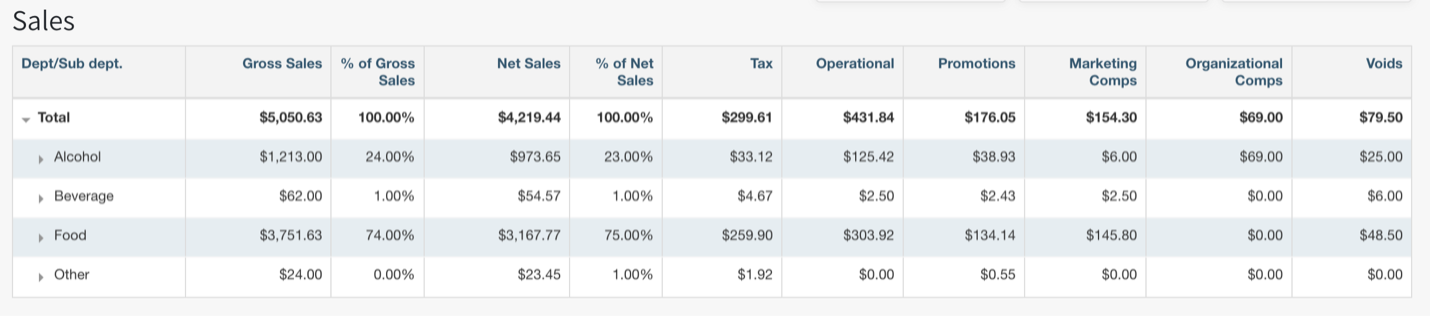
Sales are broken down by department and sub-department
-
Gross Sales = Net Sales plus comps and promotions
-
Net Sales = All sales minus returns, comps, and promotions
-
The Operational, Marketing Comps, & Organizational Comps are defined for comps & discounts
-
These are also broken down under the Exceptions section below.
-
-
The Promotions column reflects discounts the site has offered. It’s important to note any Segments actualized will be included in the Promotions column.
-
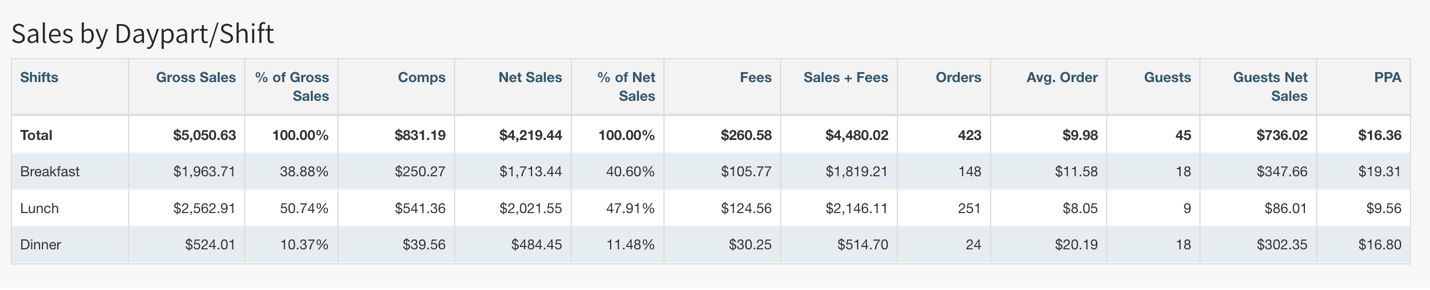
PPA (Per Person Average) includes only seated Orders where the seated duration exceeds 10 minutes divided by guest count. PPA excludes all OTC orders and any order open and closed under 10 minutes.
Sales by Daypart / Shift
-
Sales by daypart/shift are broken down into the sales made during a given shift
-
These are customized by each site
-
-
Fees are considered non-revenue Items and can have either a fixed % or dollar amount associated with them
Order Type
-
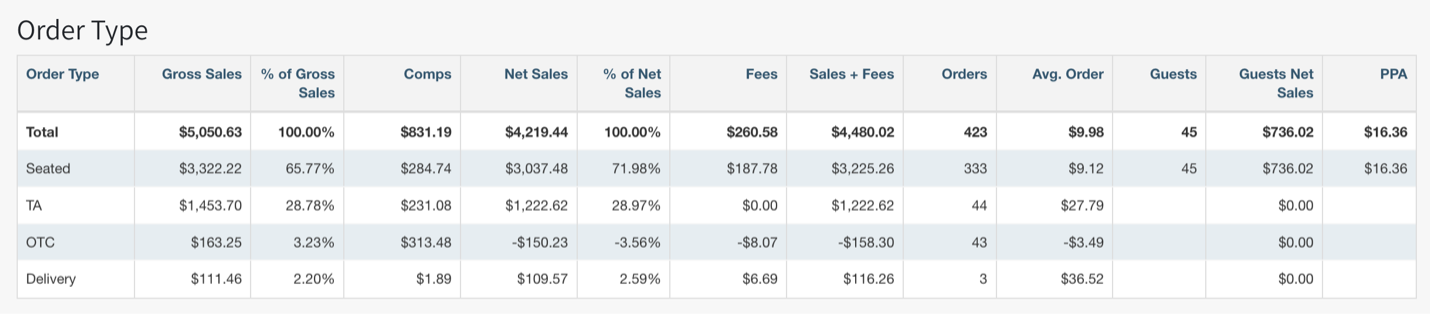
Order Type breaks down the sales by how the order was completed
-
Seated Orders are any order rang in on a table or tab
-
TA is any Takeaway order.
-
OTC is any order sold at “Eat In” through the OTC profile, or any seated order that was opened and closed in less than 10 min.
-
-
Delivery is any order that was generated through the TD profile or taken away via External Sources (DoorDash, Ubereats, etc) as Delivery.
-
Please note External Sources are dictated by the customer selection during the ordering process (pick up vs delivery)
-
Exceptions
-
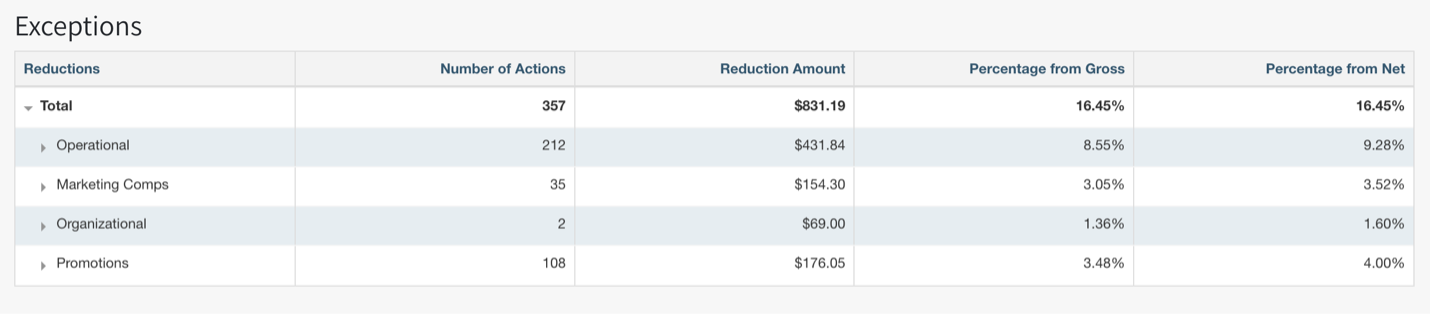
The Exceptions section is further broken down across the groups from the Sales section
-
Comps are broken down into three groups: operational, marketing, organizational
-
Operational: Customer had an issue with an order or experience.
-
Marketing: Friends & family, purchasing a guest’s meal or beverage
-
Organizational: Employee meals, manager discount
-
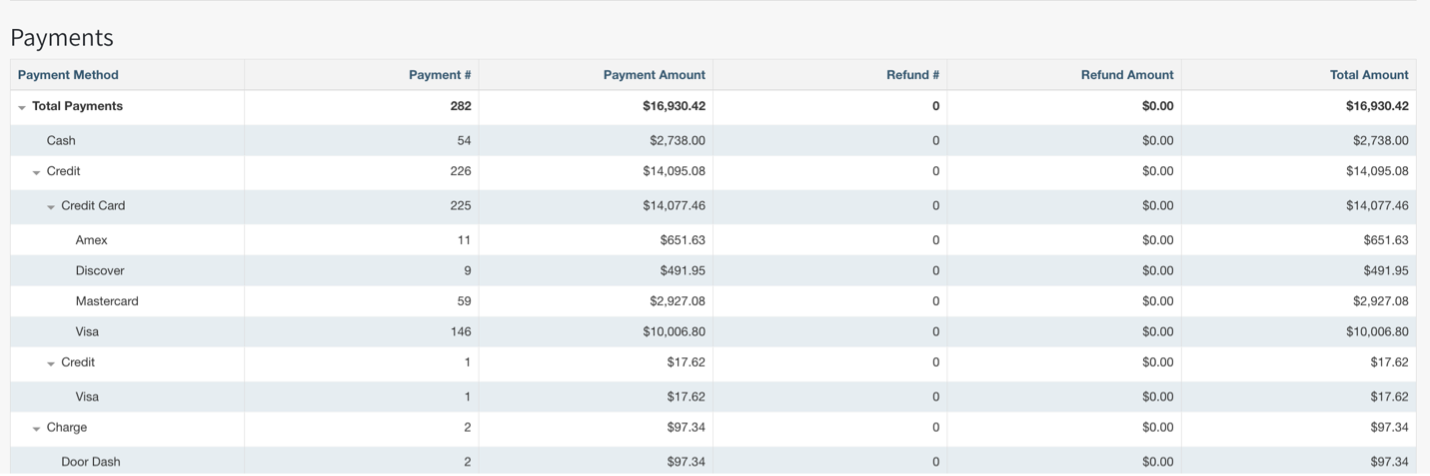
Payments
This section breaks down all forms of payments used throughout the business day, as well as how many transactions on that specific tender type were completed
Cash Summary
Cash Summary shows the total amount of cash transactions for the day, and any reasons related to cash drawer opening. If Pay In/Pay Out reasons are set up, these will reflect here

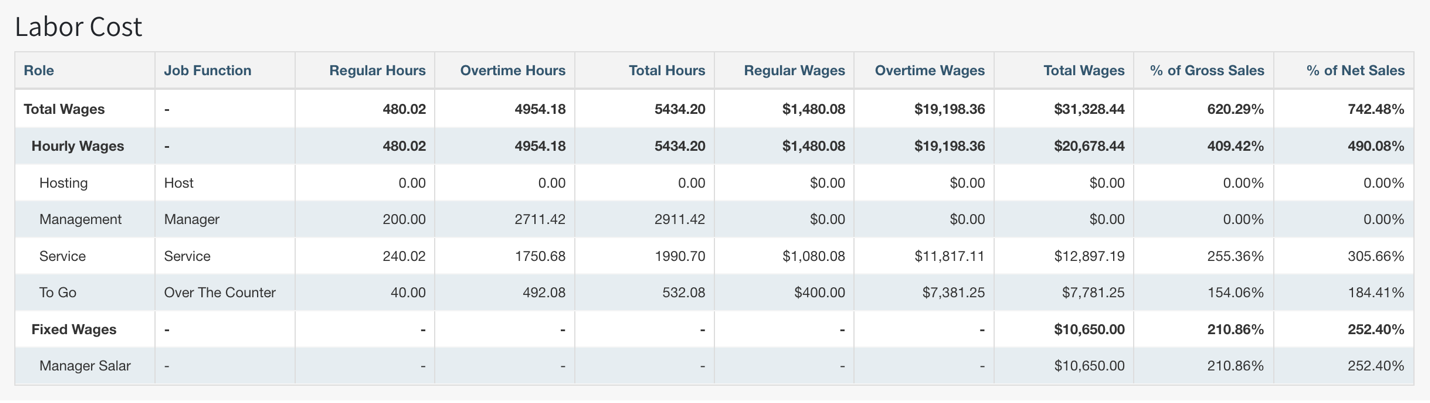
Labor Cost
Labor Cost is broken down by role/Job Function for the day and is also calculated as a percentage of any Job Function that has sales allocated
Tips & Cash Balance
Cash On Hand should match Cash Payments from the Payments section above.
If a site pays out tips to staff, it’s important to note that “cash on hand - subtotal cash on hand - subtotal (tips & service charge) = total cash balance

Fees
Configured fees charged throughout the day will reflect here. Fees are considered “non-revenue” items

Taxes
Configured Tax Rates collected will reflect here

Tax Summary
Summary of all collected taxes

Revenue Centers
If a site has multiple outlets or areas of revenue centers configured, they will be broken down by outlet or “Revenue Center” to reflect the total sales by each area
